Claude Code can do more than suggest a fix. It can edit files, install dependencies, run tests, and start your application.
But letting it finish a task on its own raises a practical question: how much of your computer should those commands be allowed to affect?
Approving commands one at a time keeps you involved in every step. Removing those prompts lets Claude keep working, but you still need a way to limit its access.
Docker Sandboxes provides that boundary by running Claude inside a lightweight Linux virtual machine, called a microVM, with controlled access to your project and the network.
I wanted to see how useful that freedom would be, and where its limits were. Inside a Docker sandbox, Claude added a health endpoint to my Flask app, wrote a test, built a Docker image, passed all three tests in a container, and checked that the application responded. It finished without asking me to approve a command.
I also tested Docker’s two project modes. In direct mode, the sandboxed Claude could change a project folder on my Mac immediately. In clone mode, it worked on a separate copy inside the sandbox, so I could review its changes before applying them to the original project. I then tested which files Claude could read, change, and send over the network.
In this article, you’ll learn what Docker Sandboxes isolates, what those tests revealed, and how to run Claude in a sandbox with your own project. You’ll choose between direct and clone mode, configure network access, and review Claude’s work before using it.
Table of Contents
- Prerequisites
- What the Sandbox Isolates
- What the Experiment Showed
- Install Docker Sandboxes and Sign in
- Choose the Network Access Claude Needs
- Start Claude in Your Own Project
- Review the Work Before Using it
- Keep Unrelated Secrets Out of Claude’s Reach
- Run the Application and Open it in Your Browser
- Stop the Sandbox Without Losing Your Work
- Conclusion
Prerequisites
To follow the commands in this article, you’ll need:
- Basic terminal skills and familiarity with Git commits, branches, and diffs. Knowing what Docker images and containers are will help with the application example.
- An Apple-silicon Mac running macOS Sonoma 14 or later, with Homebrew and Git installed. These instructions use macOS. Docker documents installation on other supported platforms.
- A Docker account, plus a Claude subscription that includes Claude Code or an Anthropic API key. We’ll walk through signing in below.
- A local project to work on. To use clone mode, it must be a Git repository with an initial commit. The example task uses Flask, but you can give Claude a task suited to your own project.
You don’t need Docker Desktop or Docker Engine installed on your Mac. We’ll install Docker’s sbx command below.
What the Sandbox Isolates
Your computer is the host. The sandbox is a separate Linux environment running on it.
Ordinary Linux containers share the kernel of the Linux system running them. A Docker Sandbox has its own kernel, the part of the operating system that manages processes and hardware access. This separates the sandbox’s operating system from the host operating system.
Claude has sudo access inside the sandbox, so Claude can run commands as a Linux administrator. For example, Claude can install software or change system files inside the sandbox.
Those permissions don’t make Claude an administrator of your Mac. The folder you choose to share with Claude has its own access rules. (Source: Docker’s isolation documentation)
Docker’s Claude integration starts Claude inside the virtual machine with this command by default:
claude --dangerously-skip-permissionsThe flag disables Claude’s ordinary tool-approval prompts. Docker supplies the isolation and controls access to files and network destinations. You launch this environment from your computer using Docker’s sbx command. (Source: Docker’s Claude Code integration documentation)
Docker Sandboxes offers two ways to make your project available to Claude:
| Mode | Where Claude works | What happens to the files on your computer |
|---|---|---|
| Direct mode | The project folder you select on your computer | Claude can read, change, create, and delete files in that folder immediately. |
| Clone mode | A separate copy of your Git project inside the sandbox | Claude can read the original folder, but its edits stay in the sandbox until you retrieve and apply them. |
Claude runs inside a virtual machine in both modes. Direct mode gives that virtual machine permission to change a particular folder on your computer. It doesn’t mean Claude runs directly on your Mac.
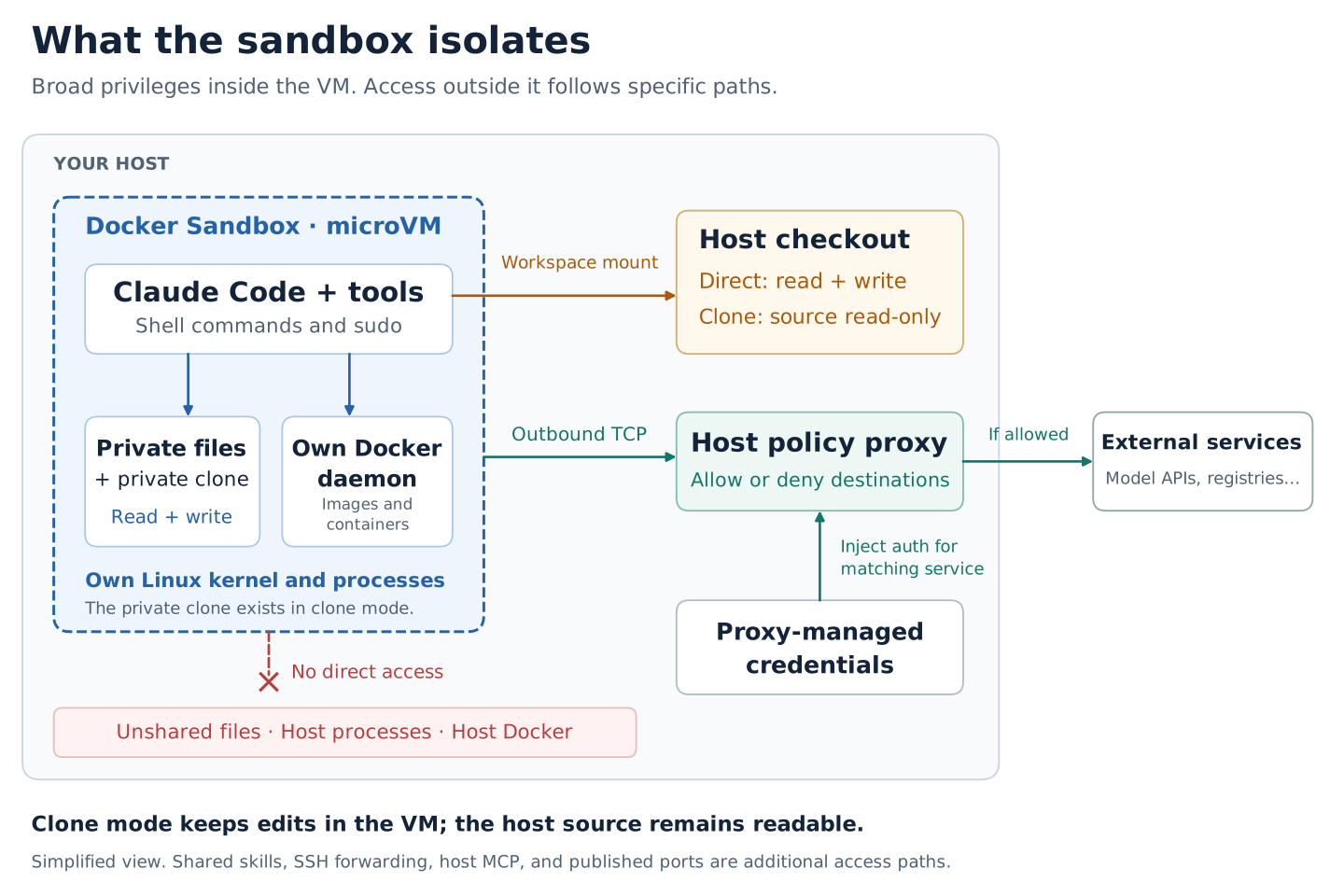
The diagram separates Claude’s working environment from the rest of your computer. Inside the virtual machine, Claude can run shell commands, install software, and create private files. It also has a separate Docker Engine for building images and running containers.
The connection labeled “Workspace mount” makes your project folder available inside the sandbox. “Host checkout” means that project folder on your computer. In direct mode, Claude can read and change those files immediately. In clone mode, Claude can read the original folder but makes its changes in a separate copy inside the virtual machine. You retrieve its commits and review them before applying them to your original project.
The network arrows show another controlled connection. Outgoing requests pass through a proxy on your computer that checks whether the destination is allowed. For credentials managed through that proxy, the proxy adds authentication to requests for the matching service. This lets a request use an API key without storing that key in the sandbox.
The crossed-out connection shows what these permissions don’t provide: direct access to unshared files, running processes, or the Docker Engine on your computer. The diagram shows the basic setup. Additional integrations and published application ports create connections that you configure separately.
What the Experiment Showed
In direct mode, I asked Claude to delete a project file and add a Git hook, a script Git can execute during operations such as switching branches. Both changes appeared in the project folder on my Mac immediately. That was the access direct mode was configured to provide.
The hook exposed a review problem: ordinary git diff showed the deleted file but didn’t show the new hook. Hooks live in the repository’s .git/hooks directory, outside the files Git normally includes in commits. We didn’t run the hook.
The lesson is that reviewing a direct-mode session may require inspecting more than the code diff.
In clone mode, Claude deleted a file and committed changes in its private copy. The original project on my Mac stayed unchanged. I could fetch the branch and inspect its diff before applying anything. The private Git hook didn’t come with the fetched commit.
Claude also couldn’t read a test file I placed in a separate, unshared folder on my Mac. But it could read files inside the project in both modes. When I explicitly allowed a network connection to a test server, Claude could send a readable test value to that server. Protecting files from edits doesn’t make their contents secret.
These findings point to a practical choice: use direct mode when you want immediate edits in your editor. Use clone mode when you want to review the work before it changes your project.
The experiment repository contains the detailed procedure and recorded results. You don’t need its test files to use the setup below with your own project.
Install Docker Sandboxes and Sign in
I used sbx v0.43.0 on an Apple-silicon Mac. The Mac installation requires macOS Sonoma 14 or later. You don’t need Docker Desktop or a Docker Engine installed on your Mac. Run the following commands in your Mac’s terminal:
brew trust docker/tap
brew install docker/tap/sbx
sbx login
sbx version
If sbx is already installed, use brew upgrade docker/tap/sbx to update it. The version command tells you which release you have. The experiment’s results are for v0.43.0. (For more information, see Docker’s installation instructions.)
sbx login signs you in to Docker. Claude needs separate authentication. If you use an Anthropic API key, store it by running this command on your Mac and entering the key when prompted:
sbx secret set ANTHROPIC_API_KEYIf you use a Claude subscription instead of an API key, you’ll authenticate through Claude’s browser-based login when you start Claude inside the sandbox for the first time.
Choose the Network Access Claude Needs
Claude needs network access to download tools and dependencies during its task. sbx provides a default allow list that permits common package registries and CDNs.
If Claude needs to call an external API during its task, add that domain to the allow list. To see the current list, run:
sbx policy listTo add a domain, run:
sbx policy allow <domain>To remove a domain, run:
sbx policy deny <domain>The network proxy enforces these rules for all sandboxes you start. Changes take effect for new sandboxes. Requests to domains not on the allow list are blocked.
Start Claude in Your Own Project
Navigate to your project folder, then start a sandbox with one of these commands:
Direct mode — Claude edits your project folder directly:
sbx run claude --workspace .Clone mode — Claude works on a copy inside the sandbox:
sbx run claude --clone .Both commands open a terminal inside the sandbox with Claude running. Give Claude a task at the prompt. The example task was:
Add a
/healthendpoint to the Flask app. Write a test for it, build a Docker image, run the tests inside a container, and confirm the app responds on port 5000.
Claude will work through the task without asking you to approve each command.
Review the Work Before Using it
Direct mode
In direct mode, Claude’s changes are already in your project folder. Review them with your normal Git workflow:
git diff
git status
Remember that git diff shows changes to tracked files. It won’t show new files in .git/hooks or other directories Git excludes from commits. Check those locations separately if Claude’s task involved them.
Clone mode
In clone mode, Claude commits its changes to a branch inside the sandbox. To retrieve that branch, run this command on your Mac:
sbx checkoutThis fetches Claude’s branch into your local repository without applying it. Inspect the diff:
git log FETCH_HEAD
git diff main...FETCH_HEAD
If the changes look right, merge or rebase as you normally would. If they don’t, discard the branch and start over.
Keep Unrelated Secrets Out of Claude’s Reach
The sandbox can read files in the folder you share. If your project folder contains credentials for unrelated services — tokens, keys, or config files that aren’t needed for the task — move them out of that folder before starting the sandbox, or use a separate project folder that doesn’t include them.
Secrets managed through sbx secret set are injected by the proxy for specific services. They aren’t stored as files in the sandbox and aren’t exposed through the file system. Use that mechanism for any API keys Claude needs during its task.
Run the Application and Open it in Your Browser
If Claude starts your application inside the sandbox, you can open it in your browser on your Mac. Ports published inside the sandbox are forwarded to your Mac automatically.
For a Flask app running on port 5000 inside the sandbox, open:
http://localhost:5000Published ports are listed when you start the sandbox or when you run sbx status.
Stop the Sandbox Without Losing Your Work
To stop the sandbox, type exit at the sandbox terminal or press Ctrl+D. In clone mode, make sure you’ve run sbx checkout first to retrieve Claude’s commits. Once the sandbox stops, its internal state is gone.
In direct mode, Claude’s changes are already in your project folder and are preserved when the sandbox stops.
Conclusion
Docker Sandboxes gives Claude Code a contained environment to work in without constant approval prompts. The microVM boundary keeps Claude’s sudo access away from your Mac’s operating system, and the network proxy lets you decide which external services Claude can reach.
The two modes suit different working styles. Direct mode is convenient when you want Claude’s edits to appear in your editor right away. Clone mode adds a review step that lets you inspect and selectively apply Claude’s commits before they touch your original project. Either way, the sandbox limits what Claude can affect — but as the experiment showed, files that are readable inside the shared folder can still be sent over allowed network connections. Structure the folder you share accordingly, and use sbx secret set for any credentials Claude needs during its task.